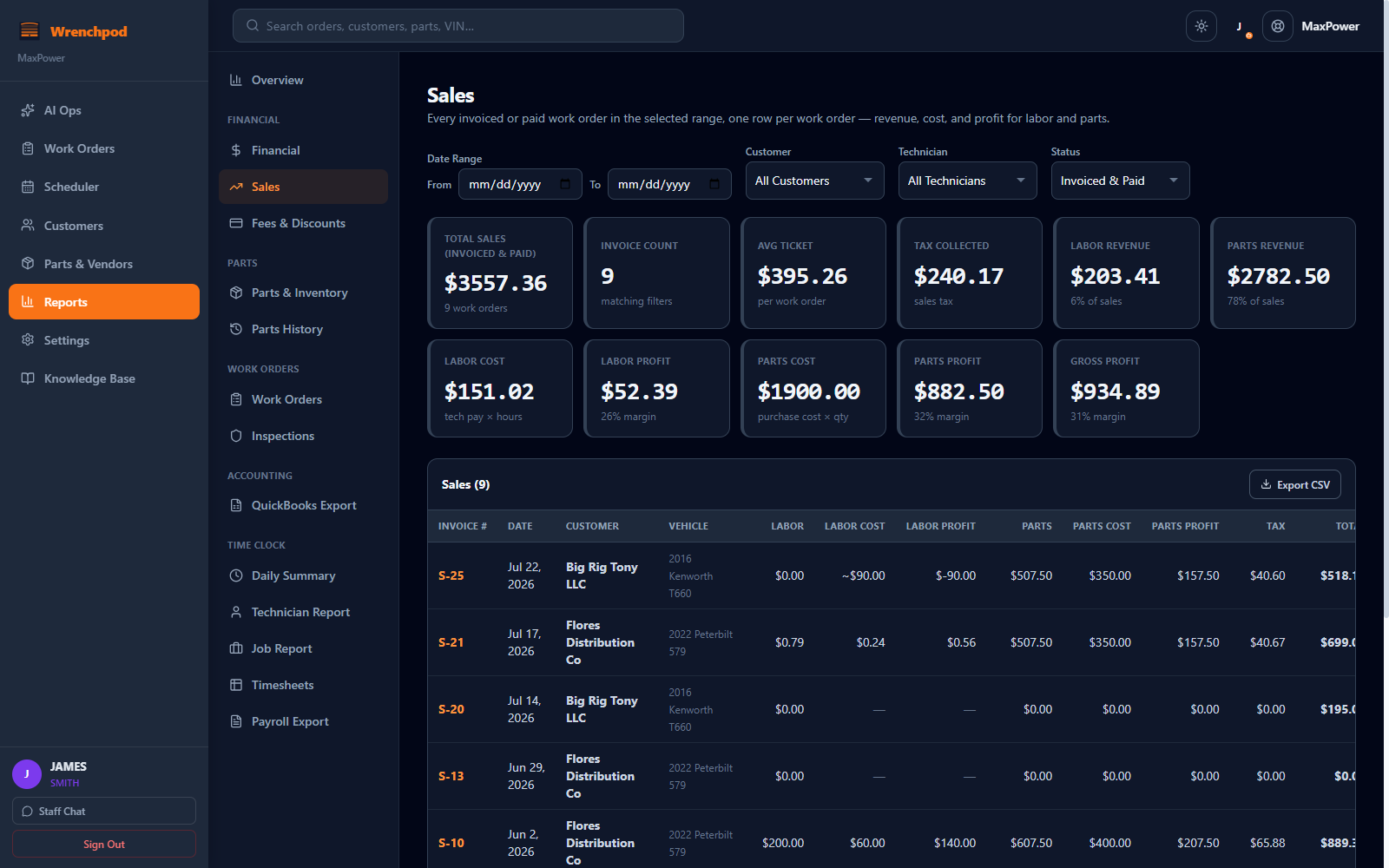
11 built-in reports — sales profit margin, accounts receivable aging, parts margin, technician efficiency, DOT status, and QuickBooks export. No spreadsheets. No separate reporting tool. No numbers that disagree with each other.
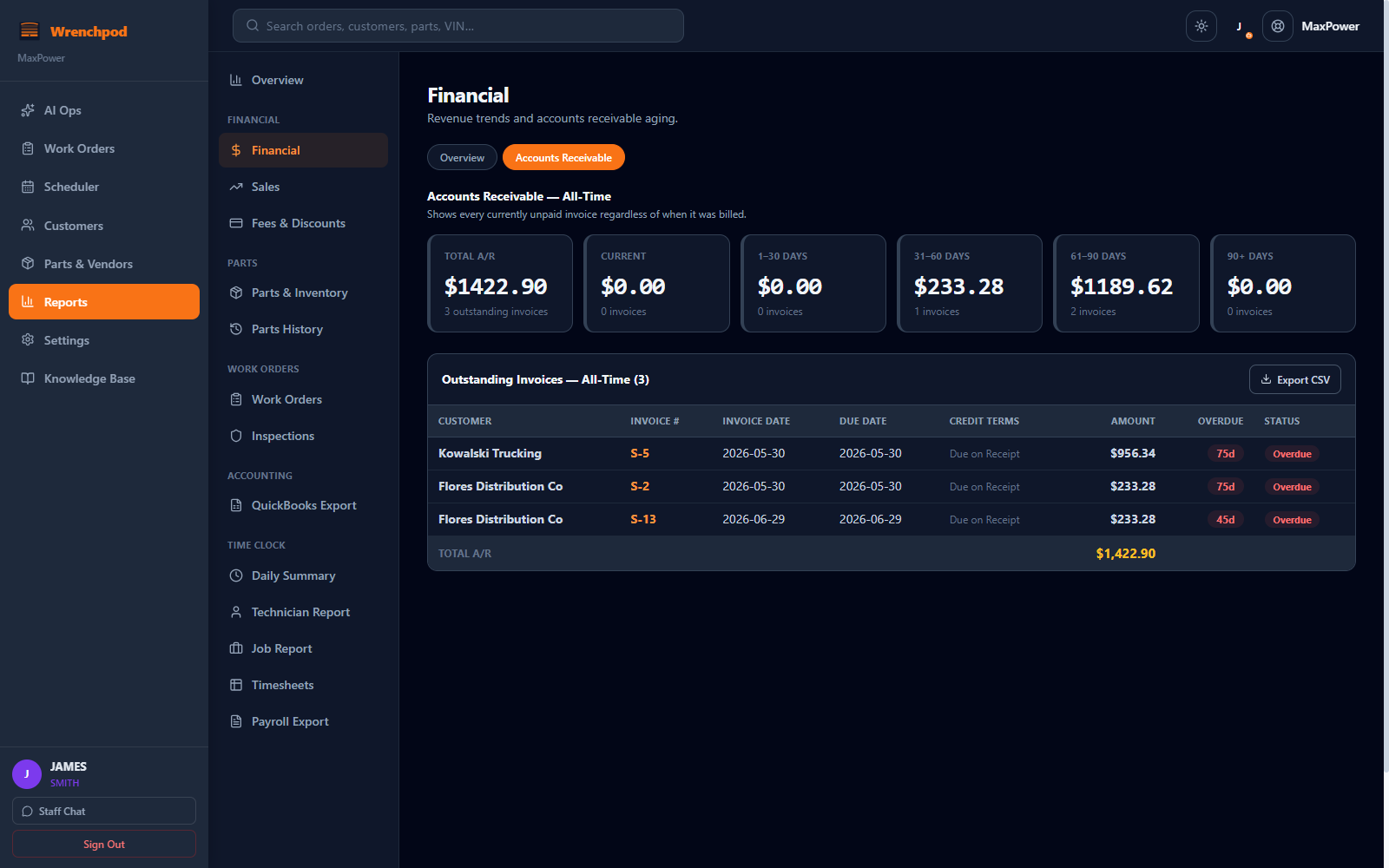
Current, 1–30, 31–60, 61–90, and 90+ days — with the customer, invoice, and days overdue for each one, so collections always starts with the oldest money first.
Not a generic BI dashboard bolted onto shop software. Every report reads directly from your own work orders, parts, and time clock — nothing to configure, nothing to connect.
Total sales, invoice count, and average ticket, split into labor and parts revenue with real cost and profit — not just what you billed. Filter by date range, customer, technician, or status.
Every outstanding invoice bucketed into Current, 1–30, 31–60, 61–90, and 90+ days overdue, with a dollar total and invoice count per bucket, so collections start with the oldest money first.
Every flat-fee or percentage charge and every discount, per work order, with the net dollar impact and how many work orders were affected in the period.
Units consumed, purchase cost, sell price, and real margin by part — plus a Parts History timeline for tracing exactly when any part moved and on which work order.
Job count, total and average value, and the labor-vs-parts revenue split across every work order in the period, plus total tax collected.
Total, completed, passed, and failed/flagged inspections, plus a dedicated count of DOT inspections with expiry tracking — your compliance worklist in one view.
Clocked hours vs. estimated hours by technician, with a computed efficiency percentage; a daily clock-in summary; and a per-job variance report showing which jobs ran over.
Total hours and estimated wages by technician for a chosen pay period — ready to hand to whoever runs payroll, with wage figures gated to the staff who should see them.
Accounts Receivable and Accounts Payable exported as CSV for QuickBooks Online or IIF for QuickBooks Desktop, plus customer and vendor lists — built from the same numbers as your invoices.
Reports, QuickBooks export, work orders, invoicing, DOT inspections, and AI assistant — included in both plans. No add-ons, no location fees, no reporting tier to upgrade into.
Shop Plan saves money vs. Per-Seat at 4+ users. See the full plan comparison →
Most independent shops either run no real reporting or bolt generic accounting software onto a shop tool that was never built to report on labor, parts, and technician time together. Wrenchpod builds 11 report views directly into the shop-management platform, computed from the same live work order data as the invoices.
Yes. Sales and Financial Overview break every dollar into labor revenue, labor cost, labor profit, parts revenue, parts cost, parts profit, and gross margin — not just what was billed, and disclosing which work orders are missing pay data rather than guessing.
Yes. The Accounts Receivable report buckets every outstanding invoice into Current, 1–30, 31–60, 61–90, and 90+ days overdue, with a dollar total and invoice count per bucket, so collections start with the oldest balances first.
Yes. QuickBooks Export generates Accounts Receivable and Accounts Payable as CSV for QuickBooks Online or IIF for QuickBooks Desktop, plus customer and vendor lists, built from the same numbers as your invoices and vendor bills.
Yes. The Technician Report compares each tech's estimated hours to actual clocked hours and computes an efficiency percentage. A Job Report shows the same variance at the work order level, and a Payroll Export summarizes hours and estimated wages by technician for a pay period.
Yes, by design. Every figure across every report is computed with the exact same math used to generate the customer's invoice — the same tax rules, labor and parts totals, fees and discounts. A report number can never disagree with what a customer was actually billed.
30-day free trial. No sales call required. Every report is live the moment you create your first work order.
Per-Seat: $79/user/month · Shop Plan: $249/month flat · No location fees · No contracts