🚛 Heavy-Duty Truck Shop Software

Every feature your shop needs.
Nothing you don't.

Wrenchpod is built from the ground up for independent heavy-duty truck and diesel repair shops. Work orders, invoicing, AI assistant, staff chat, DOT inspections — all in one place at $79/user/month.

Work Orders

From pulling in to pulling out — tracked every step.

Create a work order in under 2 minutes. Add the customer, vehicle, labor lines, and parts. Assign it to a tech. Track status from open to invoiced to paid — all in one place. No paperwork, no lost jobs.

  • Create a complete work order in under 2 minutes
  • Add multiple labor lines with individual time tracking
  • Attach parts directly to the work order — inventory auto-deducts on invoice
  • Track status: Open → In Progress → Completed → Invoiced → Paid
  • Assign work orders to specific technicians
  • Add internal notes visible only to your team
Scheduler

See every tech's day at a glance — and catch conflicts before they're a problem.

Drag work orders onto a tech's column to book them. Overlapping jobs lay out side by side instead of stacking on top of each other, and a banner at the top flags every scheduling conflict — a tech double-booked or a job scheduled outside your posted business hours — with the exact work orders and times involved.

  • Day, week, and month views, filterable by technician
  • Drag a work order onto a tech's column to schedule it
  • Overlapping jobs display side by side, not stacked and jumbled
  • One banner surfaces every conflict — double-bookings and outside-hours jobs — with details
  • Business hours and time zone are shop-configurable, and used for both the Scheduler and the AI Assistant
  • Click any event to jump straight into its work order
⚠️ 1 conflict — Mike R. double-booked at 10:00 AM
Mike R.
10:00 AM
WO-2041
Brake service
WO-2044
Air dryer swap
1:00 PM
WO-2038
DOT inspection
Dave T.
9:00 AM
WO-2036
Clutch replacement
6:30 PM · after hours
WO-2050
Emergency roadside
Professional Invoicing

Invoice sent. Payment link included. Done.

Convert a completed work order to a professional, branded invoice in one click. Email it directly to your customer or fleet manager. Include a payment link so they can pay before the truck leaves the yard.

  • One-click conversion from work order to invoice
  • Email invoices directly to customers — branded with your shop name
  • Payment link included in every invoice
  • Mark invoices as paid with one tap
  • Track outstanding invoices and accounts receivable
  • PDF download for your records
Wrenchpod — Your Shop Name
Invoice #1042 · Due on receipt
Bill to:
ABC Trucking
Brake service — 2.5 hrs @ $130$325
Air dryer replacement — 2.0 hrs @ $130$260
Air dryer unit (cost $210 × 1.4)$294
Brake pads set (cost $98 × 1.4)$137
Tax (8.25%)$83
Total$1,099
Pay $1,099 Online →
Estimate Approvals

Send an estimate. Get a yes. Start the job.

Email an estimate to the fleet manager or owner before you start work. They approve or decline from their phone — no login required. You get notified instantly and convert to a work order with one tap. No more phone tag.

  • Create and email estimates before starting work
  • Customers approve or decline from any device — no account needed
  • Instant notification when approval comes in
  • Convert approved estimate to work order in one click
  • Declined estimates tracked in your history
  • Partial approvals supported — approve individual line items
Customer receives this email →
Estimate #EST-089 — 2019 Peterbilt 579
From: Your Shop Name · Pete's Freight
DPF cleaning + EGR valve replacement — estimated $1,340. Please approve to schedule.
✓ Approve
✗ Decline
Approved by Pete Johnson
2 minutes ago · Ready to schedule
Deposits & Customer Credit

Collect a deposit. Track it. Never lose it on a sticky note.

Ordering a special part or holding a bay for a big job? Record a deposit right on the work order — it shows on the invoice, reduces the balance due automatically, and stays visible even if it's later refunded. Making a warranty comeback right without touching cash? Issue store credit and apply it to any future invoice.

  • Record a deposit on any work order, any status — before an invoice even exists
  • Deposits reduce the balance due on the invoice automatically, with a full audit trail
  • Refund a deposit and it stays on the record, struck through, never silently deleted
  • Issue store credit for a warranty comeback, goodwill adjustment, or overcharge correction
  • Credit balance is a running ledger per customer — apply it to any future invoice
  • Every Accounts Receivable and Reports figure accounts for deposits and credit automatically
Invoice WO-1042 — 2021 Freightliner Cascadia
Big Rig Logistics LLC
Labor + Parts + Tax$1,284.50
Deposit Paid−$300.00
Credit Applied−$45.00
Balance Due$939.50
Customer Portal

Your customers check their own trucks. Your phone stops ringing for "just checking in" calls.

Turn it on and every customer with an email on file can sign in at your own portal link — no password, just their email — to see their vehicles, respond to a pending estimate, view and pay invoices, and request new service. Requests land in a staff inbox; accept one and it becomes a real work order in one click.

  • Email-only sign-in — no password for the customer to set or forget
  • Every vehicle on file, in one place
  • Approve or decline a pending estimate, line by line
  • View invoiced and paid invoices, with a pay link where you've set one up
  • Customers can request new service — you accept or decline from a staff inbox
  • Accepting a request creates a real work order automatically
Pete's Freight — My Account
pete@petesfreight.com
Vehicles
Estimates
Invoices
Pending your approval
2019 Peterbilt 579 · Estimate #EST-089
DPF cleaning + EGR valve replacement — $1,340
DPF cleaning — 2.0 hrs
EGR valve replacement — 1.5 hrs
Approve Estimate — $1,340
DOT Inspections (U.S.)

49 CFR Part 396-compliant certificates. Automated reminders.

Generate U.S. federal DOT annual inspection certificates that meet 49 CFR Part 396 requirements. Email them directly to customers. Set automated reminders before the next inspection is due — so you never miss a deadline and neither does your customer.

  • Generate DOT-compliant annual inspection certificates per 49 CFR Part 396
  • Covers all 13 inspection categories per Appendix A to Part 396
  • Records inspector name and qualification per 49 CFR § 396.19
  • Email PDF certificate directly to customers
  • Automated reminders before next inspection due date
  • Vehicle intake inspection reports also included
Time Tracking

Stop losing money on labor. See exactly where jobs run over.

Clock in by job or by individual labor line. Bill actual clocked hours or flat rate — one toggle in Settings. Actual and estimated hours are always displayed side by side so you catch the jobs bleeding money before you send the invoice.

  • Clock in on the entire work order OR per labor line
  • Bill actual hours or estimated hours — toggle in Settings
  • Actual vs estimated displayed side by side on every line
  • Multiple techs can clock into the same job
  • Overtime and idle time tracked separately
  • Labor billing rate set per tech or per service type
Brake service● Clocked in 2h 14m
Estimated
2.5 hrs
Actual
2.7 hrs
Air dryer replacementCompleted
Estimated
2.0 hrs
Actual
1.5 hrs ✓
Billing mode
⚡ Actual hours — 4.2 hrs @ $130 = $546
Labor Matrix

Short jobs cost more to run. Price them that way — automatically.

A flat hourly rate quietly undercharges your fast jobs — the ones with more diagnostic time and shop overhead per hour than a half-day repair. Build a labor matrix once, tier it by job length, and Wrenchpod adjusts the rate automatically on every labor line, with the exact math shown before anything saves.

  • Tier the markup by job length — shorter jobs carry the bigger markup, the way real shops price
  • Choose how it applies: raise the hourly rate, or raise the billed hours — hours worked never change either way
  • Simple tiering, or Compound — a progressive bracket curve, the way income tax brackets work
  • Assign a matrix to any labor rate, or leave a rate flat — it's fully opt-in, rate by rate
  • Every adjustment shows on the labor line before you save it — never a surprise on the invoice
  • The applied rate freezes onto the line at save time — editing the matrix later never reprices old work orders
Standard Labor Matrix
Settings → Labor → Labor Matrices
HoursMarkup
0 – 0.5+60%
0.51 – 1+40%
1.01 – 2+25%
2.01 – 4+15%
4.01 – 8+10%
8.01++0%
Worked example — 2.5 hrs at $100/hr
Bills 2.50 hrs at $115.00/hr = $287.50 (was $250.00)
Applied on a real labor line
Brake service $287.50
Standard Labor Matrix adds 15% at 2.5 hrs — billing at $115.00/hr instead of $100.00.
Works Offline

No signal in the bay? Your tech keeps working. Nothing gets lost.

Metal buildings, remote yards, and roadside calls kill cell signal — Wrenchpod keeps working anyway. Install it on a phone or tablet and it loads even with zero bars, showing whatever work order was open last. A tech can clock in, clock out, and write a tech story with no connection at all — every change is saved on the device and syncs automatically the second signal comes back. No re-entering anything, no lost labor hours.

  • Installed app loads instantly, even with no signal at all
  • View your last-synced work orders while offline
  • Clock in, clock out, and add a tech story with zero connection
  • A banner shows what's pending — nothing syncs silently or gets lost
  • Reconnects and syncs automatically — no manual retry, no re-typing
You're offline — changes will sync automatically once you're back online.
WO-2043 · 2021 Kenworth T680
Replace clutch assembly
Clocked in · 1h 42m
Pending sync
Tech story
Pulled trans, clutch was down to rivets. Swapping in new disc, pressure plate, and throwout bearing now.
Saved on this device — will sync the moment you're back online.
Reports & Analytics

11 built-in reports. Every number ties out to the invoice.

Most shop software gives you one dashboard and calls it reporting. Wrenchpod has 11 real report views — computed with the exact same math as your invoices, so a figure in Reports never disagrees with what a customer was actually billed.

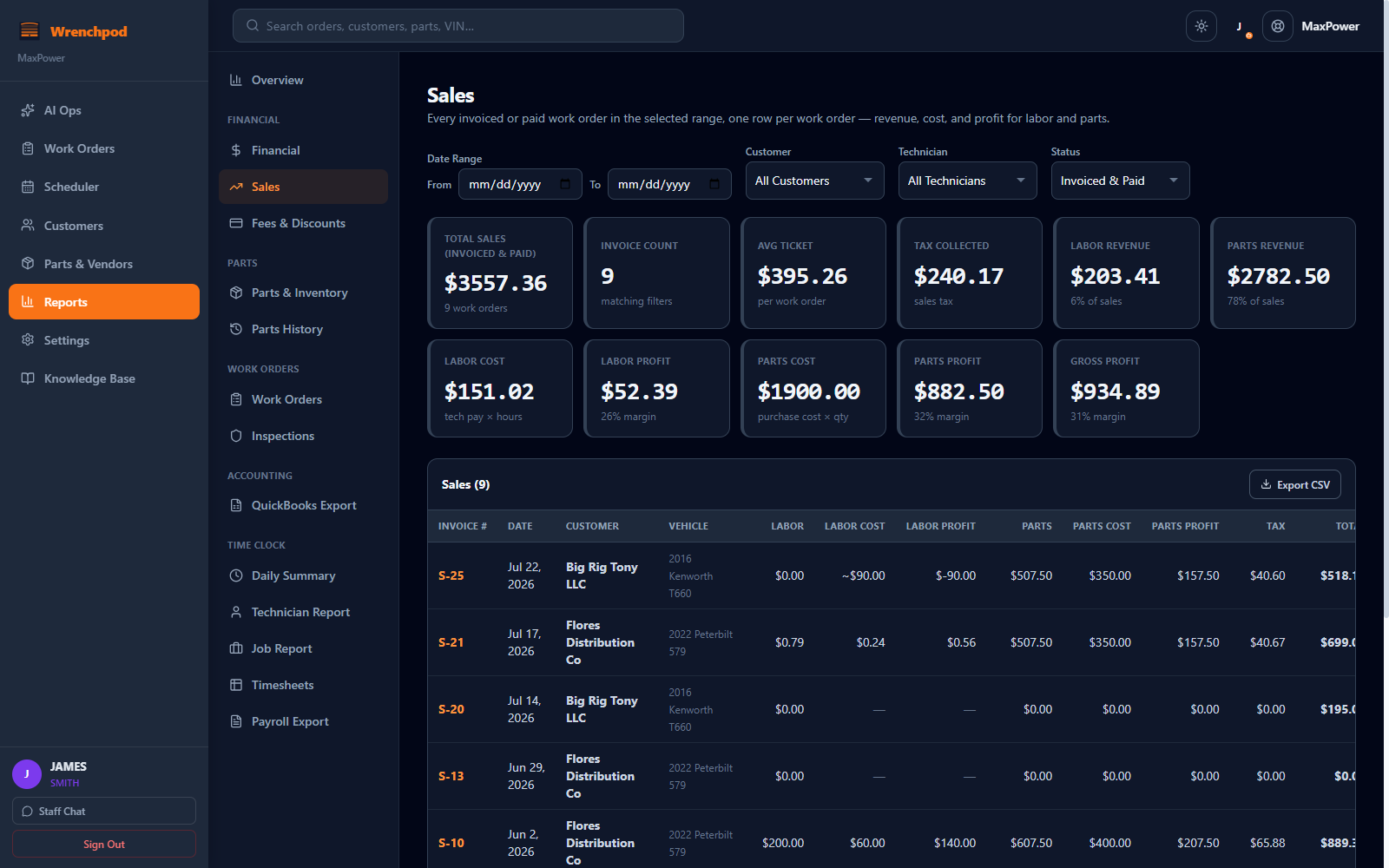
  • Financial & Sales — total revenue, gross profit margin, and outstanding invoices by any date range; a Sales report split into labor and parts revenue with real cost and profit, not just what you billed — filterable by customer, technician, and status
  • Accounts Receivable aging — every outstanding invoice bucketed into Current, 1–30, 31–60, 61–90, and 90+ days overdue, so you know exactly who to call first
  • Fees & Discounts — every flat-fee or percentage charge and every discount, per work order, with the net dollar impact on your bottom line
  • Parts & Inventory margin — units consumed, purchase cost, sell price, and real margin by part, plus a Parts History timeline for tracing when any part moved and why
  • Work Orders & Inspections — job value and labor/parts revenue split across every work order; pass/fail counts and DOT inspections with expiry tracking built in
  • Time Clock & Payroll — a daily clock-in summary, a per-technician efficiency report comparing estimated to clocked hours, a per-job variance report, and a payroll-period export by technician
  • QuickBooks export — Accounts Receivable and Accounts Payable as CSV for QuickBooks Online or IIF for QuickBooks Desktop, built from the exact same numbers as your invoices, nothing to reconcile

See every report and every KPI in detail →

Wrenchpod Sales report showing real labor and parts profit margin, tax collected, and gross profit for a heavy-duty truck shop
AI Assistant

Ask anything. Take action. Learn the system. 24/7.

No other shop management software has this. Wrenchpod's built-in AI assistant answers questions from your live shop data, takes action on your command with one-tap confirmation, and walks you through every feature step by step. No support tickets. No waiting on hold.

  • “Who owes me money?” — live list with amounts and days overdue
  • “Email WO-1042 to ABC Trucking” — proposes the action, you confirm in one tap
  • “How do I set up multiple tax rates?” — step-by-step walkthrough, any time of day
  • “What parts are running low?” — live inventory snapshot, instantly
  • Powered by Claude · always has access to your live shop data
  • No other truck shop software offers an AI that answers, acts & teaches
AI Ops

The money your shop can't see — ranked, and one click from fixing.

Completed work you forgot to bill. Invoices aging past 60 days. Quotes the customer never answered. Jobs that lost money. Parts about to stock out. DOT inspections coming due. Wrenchpod's AI Ops radar surfaces every one of them, puts a dollar figure on it, ranks it by amount and age, and gives you a one-tap action — Invoice, Mark Paid, Schedule, Fix.

  • Revenue Leakage — completed work sitting un-invoiced, so you bill it before it's forgotten
  • Collections — receivables aged into Current / 31–60 / 61–90 / 90+ buckets, largest first
  • Margin Leak & Dead Stock — jobs under 20% margin and cash frozen in parts that don't move
  • DOT Radar — every truck expired, expiring, or never tracked — your compliance worklist
  • Data Health score — the missing fields silently corrupting your reports, fixable in place
  • All computed live from data you already have — nothing to set up
AI Automations

A Monday-morning briefing on your shop — before you finish your coffee.

Opt in and Wrenchpod emails the owner a short weekly digest every Monday: money to collect, completed work ready to bill, quotes nobody answered, DOT inspections coming due, and data gaps worth fixing. It only sends when something is actually worth acting on — no all-clear spam. Off by default, one toggle to turn on.

  • Money to collect and work ready to invoice, totalled for the week
  • Unanswered estimates and DOT inspections coming due
  • Only lands in your inbox when there's something to do
  • Preview the exact email anytime from the AI Ops screen
  • Zero setup beyond a single switch in Settings → Shop
Your shop this week — 5 things worth $8,260
Wrenchpod Weekly Digest · Mon 7:00 AM
$
$4,820 in completed work not yet invoiced
3 work orders finished and ready to bill.
$3,410 overdue past 60 days
Smith Fleet — worth a reminder this week.
2 DOT inspections due in the next 14 days
Unit 12 and Unit 27 — schedule before they lapse.
Open AI Ops to act on all of it →
Plan This Job

One decisive time estimate. Parts guidance that won't get you a wrong part.

Type a job on a labor line and tap Plan this job. Wrenchpod's AI gives you one decisive hour estimate anchored on your own shop's history for similar jobs — not a wide range that just pushes the decision back to you — plus a suggested service reason and a short how-it's-done summary, combined into one write-up so there's nothing else to open. A separate Suggest parts tap lists the gaskets, fluids, and wear items a job like this typically needs. On purpose, it never shows part numbers, brands, prices, or a source: heavy-duty fitment varies too much by engine, spec, and build date to trust an AI-guessed part number on an order — your own inventory, catalogue, and vendors stay the source of truth for that.

  • One decisive hour figure anchored on your past jobs — no range, no digging for how it got there
  • One tap fills the line's estimated hours — no range to second-guess
  • Service reason + how-it's-done summary land together, one tap to use them
  • Parts guidance is generic by design — no part numbers, prices, or sources to get wrong
  • Always advisory — you review before anything touches the estimate
Labor line
Replace EGR cooler & gaskets — Detroit DD15
Plan this job
3.5 h
Use 3.5h
Coolant leak near the water pump seal — drain the cooling system, replace the pump and gasket per spec, refill and pressure-test.
Use as service reason
Suggested parts
EGR cooler gasket set
qty 1 · check against your parts catalogue
EGR cooler assembly
qty 1 · source from your usual vendor
Coolant, 50/50
~2 gal · top off after refill
No part numbers or prices — pulled from your own inventory and vendors instead.
Tech Story AI

Every labor line gets a real tech story — even when your tech hates typing.

Each labor line has a Tech Story field — what was found, what was done, how it was verified. Tap AI write story on an empty line and Wrenchpod drafts one from the job description, service reason, parts on that line, and hours logged. Already have a few words down? AI improve story rewrites it clean without inventing work or parts you didn't already mention. It fills the editable box — your tech reviews and saves it, and it's what shows up on the customer's invoice as the technical write-up of the job.

  • Empty line: AI drafts a story from the job, parts, and hours in one tap
  • Already typed something: AI cleans it up without adding new claims
  • Always editable and reviewed before it saves — no surprises
  • Grounded in what's actually on the line — never invents parts or facts
  • Shows on the customer's invoice as the technical write-up of the job
Tech typed
egr cooler leaking, swapped gaskets + o-rings, cleared codes, test drove ok
AI improve story
review before saving
Tech Story — shows on the invoice
Found the EGR cooler leaking at the gasket surface. Replaced the cooler gaskets and O-rings, then cleared the stored fault codes. Road-tested the truck to confirm the repair — no further leaks and all codes cleared.
Scan Invoice

Snap a vendor invoice. The AI receives the parts for you.

Stop hand-keying vendor invoices. Scan Invoice is an automatic parts invoice scanner built into every plan: upload a photo or PDF of a parts invoice and Wrenchpod's AI reads every line item — part number, description, quantity, unit cost — into an editable table. You review it (nothing is saved until you confirm), then one tap receives it all: stock updated, catalogue priced off your markup matrix, vendor invoice and tax recorded. The big platforms charge extra for this. It's included.

  • Reads part #, description, qty, and unit cost from a phone photo or PDF
  • Flags each line “New part” or “Update existing” against your inventory
  • Skips freight, tax, and subtotal rows automatically — parts only
  • Nothing saves until you confirm — the AI never writes on its own
  • Receives into stock, catalogue, and a vendor invoice in one tap
  • Never invents a part number — it extracts only what's printed
Review before receiving
nothing is saved until you confirm — check every part # and cost
Vendor
FleetLine Diesel Supply
Invoice #
INV-88214
Tax
$91.92
Part #DescriptionQtyUnitStatus
BW-4S-2058Bendix 4S/2M ABS Module2$148.50+ New part
DDE-A4720DD15 EGR Cooler Gasket Kit4$36.75↻ Update existing
FLE-FS19765Fleetguard Fuel/Water Separator6$28.40↻ Update existing
HAL-GC4715Haldex Gladhand Coupler (Red)10$6.95+ New part
+ 2 more parts · Freight & Sales Tax rows skipped automatically
Parts subtotal $1,114.20 + $91.92 tax
Receive 6 parts
Staff Chat

Message your crew without leaving the app.

Real-time messaging built directly into Wrenchpod. Text your techs, share photos of a tricky part, or announce something to the whole shop — without switching to WhatsApp or texting the wrong number. Everything stays in one place.

  • All-staff channel for shop-wide announcements and updates
  • Private DMs between any two team members
  • Photo attachments up to 10MB — share parts photos, diagrams, job photos
  • Real-time delivery with online presence indicators
  • Unread badges and read receipts so nothing gets missed
  • Full message history preserved — no lost conversations
Staff Chat
4 online
All Staff
Jared K.
Mike T.
Sarah M.
JK
Jared K.
S-12 done. Torque specs were off on the diff — fixed it. Ready to invoice.
Good catch. Go ahead and mark it invoiced.
MT
Mike T.
Bay 3 is free. What's next for me?
Message all staff…

Every feature. One price. No add-ons.

$79/user/month or $249/month flat covers everything below. No location fees. No modules to unlock. No annual contracts.

🔧
Work Order Management

Create, track, and close jobs in under 2 minutes. Full status tracking from open to paid.

🗓️
Scheduler

Drag jobs onto a tech's day. Overlapping jobs lay out side by side, and one banner flags every double-booking or after-hours conflict.

📄
Professional Invoicing

Email branded invoices with payment links. One-click conversion from work order.

Estimate Approvals

Customers approve from their phone. No login required. Convert to job instantly.

🌐
Customer Portal

Email-only sign-in for your customers — their vehicles, estimates, invoices, and service requests, no password.

💬
Text an Estimate or Invoice

Connect your own Twilio number and the Text button sends for real, from any device. No Twilio yet? It opens your phone's Messages app instead.

📦
Parts & Inventory

Track stock levels, set markups, auto-deduct on invoice. Know your parts margin on every job.

🔍
DOT Inspection Reports

49 CFR Part 396 certificates. Email to customers. Automated reminders before due dates.

Built-in Time Tracking

Clock by job or labor line. Actual vs estimated displayed side by side.

⚖️
Labor Matrix

Tier your labor markup by job length — short jobs bill at a higher rate automatically, shown on the line before it saves.

🤖
AI Assistant

Ask anything, take action by command, learn every feature step by step. Live shop data. 24/7. No other shop software has this.

📈
AI Ops Radar

Surfaces un-billed work, aging receivables, thin-margin jobs, dead stock, and DOT due dates — dollar-ranked, one click to act.

📷
Scan Invoice

Snap a vendor parts invoice — the AI reads every line item, you review, and it receives into inventory in one tap.

🧰
Plan This Job

On any labor line: one decisive hour estimate from your own job history, plus generic parts guidance — no risky part numbers or prices.

✍️
Tech Story AI

Drafts or improves the tech story on a labor line from the job details — shows on the customer's invoice. Always editable, reviewed before it saves.

📩
Weekly Ops Digest

An opt-in Monday email to the owner: money to collect, work to bill, quotes to chase, DOT due — only when it matters.

💬
Staff Chat

All-staff channel, private DMs, and photo sharing — built right into the app. No WhatsApp needed.

👥
Multi-User & Permissions

Techs, service writers, and owners with role-based access. Your billing rates stay protected.

🧮
Tax Rate Suggestions

Type a customer's address and get a suggested tax rate for their state or province — you pick one of your own configured rates, always with one tap.

📋
Purchase Orders

Issue POs to vendors. Track pending orders and link received parts to jobs.

📊
Reports & Analytics

11 report views — Sales profit margin, AR aging, parts margin, technician efficiency, DOT status, and more, all by date range.

🧾
QuickBooks Export

Export AR and AP as CSV for QuickBooks Online or IIF for QuickBooks Desktop — built from the same numbers as your invoices.

🔔
Inspection Reminders

Automated email reminders to customers before DOT and vehicle inspection deadlines.

🔑
Public API Key

Generate a read-only API key in Settings for Zapier, a spreadsheet, or a custom report — no developer setup required to get started.

🏷️
Parts Price Matrices

Named markup matrices assigned by vendor, part tag, or individual part — the same tiered-pricing engine as Labor Matrix, for parts.

💵
Work Order Deposits

Collect and track a deposit before a special-order part ships. Shown on the invoice, refundable, never just a sticky note on the counter.

🏦
Customer Credit

Issue store credit for a warranty comeback or goodwill adjustment, then apply it to any future invoice — a running ledger per customer.

🧾
Vendor Tax Tracking

Track tax paid to vendors separately from customer sales tax, with a per-vendor tax rate and tax-exempt flag.

🗂️
Parts Kits

Turn any real work order into a reusable kit in one click — labor, parts, vendor, and cost all saved together for the next repeat job.

👥
Multi-Contact Invoicing

Add multiple contacts to a customer and mark more than one Primary — an invoice or statement emails to all of them at once.

🙈
Invoice Customization

Hide part numbers or your labor rate from the printed or emailed invoice, shop-wide or on a single invoice.

📱
Install & Work Offline

Add Wrenchpod to your home screen like a native app. No signal? Clock in/out and view work orders offline — everything syncs the moment you're back.
Coming soon

Features in active development — shaped by feedback from real shop owners.

Coming Q3 2026
📒
QuickBooks Export

Export invoices and payments directly to QuickBooks. Keep your books in sync without manual entry.

Coming Q3 2026
📗
Xero Export

Export invoices and payments to Xero. Designed for shops in Australia, New Zealand, and the UK.

Coming Q4 2026
💳
In-App Payments

Accept card payments directly through Wrenchpod. Faster collection, less chasing.

See it for yourself. Free for 30 days.

No setup fees. No training required. Most shops are creating their first work order within an hour of signing up.

30-day free trial  ·  No card required to start  ·  $79/user/month after